
Luna-tic!
Luna-tic! puts sun and moon rise/set times and lunar phases on your wrist, with clear visuals and a glance-friendly widget view.
Key Features
- Moon rise and set times for today
- Sun rise and set times for today
- Visual display of the current moon phase
- Common name of the current lunar phase
- Date of the next full and new moon
- Approximate time of day for the next full and new moon
- Runs as an app with a widget / Glance view (on supported devices)
This application is built using the open-source SolarSystem library from IoannisNasios: github.com/IoannisNasios/solarsystem .
Accuracy
For everyday use (planning runs, dives, or evening stargazing), Luna-tic’s sun and moon times are typically within a few minutes of professional astronomy sites.
Sun rise and set values closely match Garmin’s built-in sunriseset functions and are
usually within about 1 minute of observatory-grade data. Due to the limitations of floating-point
math on Garmin Connect IQ devices and the complexity of lunar mechanics, lunar rise and set times
can vary by roughly ±15–20 minutes compared to observatory predictions, and full/new moon times may
differ by up to about ±8 hours.
The visually displayed moon phase is generally very close to the actual appearance of the moon in the sky.
Getting Started
- Install Luna-tic! from the Garmin Connect IQ Store.
- Add it to your widget / Glance list on supported devices.
- Go outside once to let your watch acquire a GPS fix.
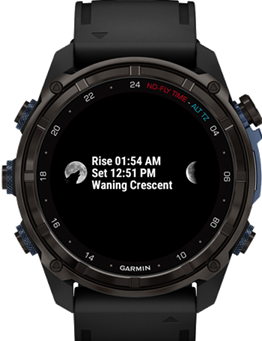
Supported Garmin devices running Connect IQ 4.0.0 or higher can add Luna-tic! as a widget (Glance view). The Glance view shows today’s moon rise/set times, the current phase name, and a visual image of the moon that’s easy to read at a glance.
Opening Luna-tic! from the Glance view or from the Applications list launches the full app, which includes four pages:
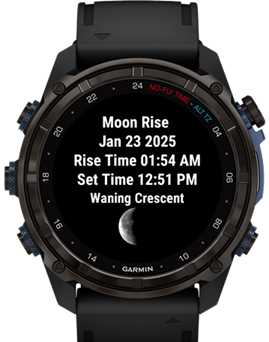
- Page 1: Today’s date, today’s moon rise and set times, the phase name, and a large graphical moon image.
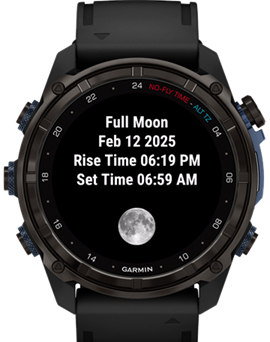
- Page 2: Details for the next full moon, including date, rise/set times, and a full-moon image.
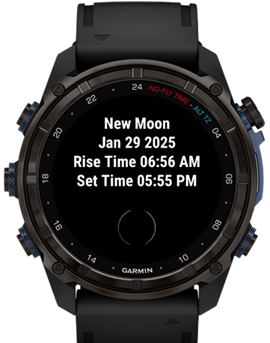
- Page 3: Details for the next new moon, including date, rise/set times, and a new-moon image.
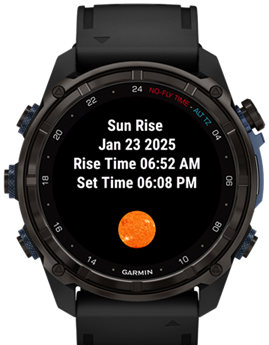
- Page 4: Today’s sun rise and set times.
GPS and Location
Luna-tic depends on your current location to perform its calculations. If the app shows “Waiting for GPS”, go outside for a minute so your watch can get a GPS fix.
Once a location has been determined, the app caches your most recent GPS coordinates and uses them as a quick reference on future launches. While the app is running, it refreshes location data (if available) roughly every 30 seconds. If you travel a long distance between uses, simply run the app outside again to update your position.
Screens
Below are examples of the Luna-tic Glance view and full app pages on a Garmin watch.
Terms & Conditions | Privacy Policy | Contact