Basic Mode Main Menu
The Basic Mode main menu lets you configure the most important parts of FTMS All Sync directly on your Garmin device – without needing Connect IQ or Garmin Express.
This page explains the options available in Basic Mode. For advanced features such as alarms, auto-lap, and dynamic workouts, see the Pro Mode Features page.
At a Glance
From the Basic Mode main menu you can:
- Select which type of fitness machine and activity you want to record
- Switch between light and dark theme colors
- Customize which metrics are shown in each of the six data fields (Full version only)
Activity
Use the Activity menu to tell FTMS All Sync both:
- Which type of fitness machine you are using, and
- Which activity type should be recorded in Garmin Connect.
You can choose from the following machine / activity types:
- Indoor biking
- Elliptical
- Indoor rowing
- Stair climber
- Stair stepper
- Treadmill
The selected Activity controls how your workout is labeled in Garmin Connect and which FTMS metrics are available (for example, only elliptical and treadmill support incline). Make sure you pick the type that matches the machine you are actually using.
Theme Color
The Theme Color option lets you switch between light and dark display themes:
- White – light background, useful in bright gyms or daylight
- Black – dark background, ideal for low-light environments and night use
Theme selection is a visual preference only; it doesn’t change how data is recorded. Choose whichever is easiest for you to read during a hard workout.
Edit Display Fields
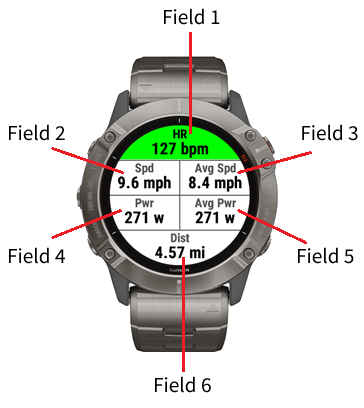
From the Edit Display Fields option, you can customize which metrics appear in each of the six data fields shown during the activity.
Note:This option is not available on the Lite version. Use Connect IQ or Garmin Express to customize which metrics are displayed in each field.
Key points about display field editing:
- There are six visible data fields on the main workout screen. Each field can be assigned to any of the available metrics for the current activity type.
- Available metrics depend on the machine and FTMS data it provides (for example, not all trainers report power, incline, or stroke rate).
- Layouts are stored separately for each activity type, so you can have one setup for rowing and a completely different one for treadmill workouts.
- Each Activity type stores its own layout of metrics fields to be displayed.
A common approach is to place your “must see” metrics (such as distance, speed, and heart rate) in the top rows, and secondary metrics (such as cadence or power) in the lower fields.
Terms & Conditions | Privacy Policy | Contact